Integrating Aihao: A Practical Guide to Calligraphic Display Typography
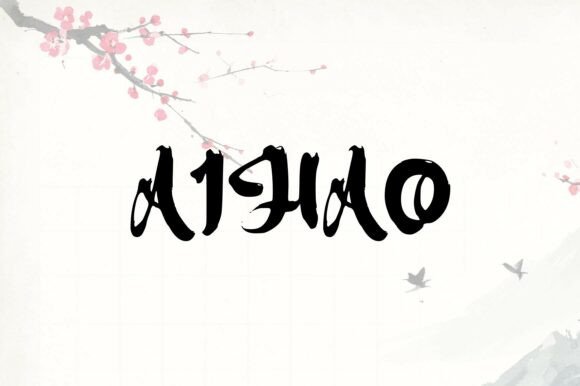
Aihao is a captivating display font that blends traditional calligraphic artistry with modern readability. Its unique character shapes, reminiscent of brushstrokes, give it an elegant and sophisticated feel while maintaining clear legibility. For designers, marketers, and content creators, this typeface represents more than just an aesthetic choice; it is a functional tool for establishing visual hierarchy and cultural resonance. Unlike purely decorative scripts that often sacrifice clarity for style, Aihao occupies a strategic middle ground. It allows for the expression of refined exoticism and handcrafted aesthetics without compromising the user experience or brand communication goals.
In a professional design workflow, selecting Aihao requires understanding its specific role within the broader typographic system. It is not a workhorse text face intended for long-form reading. Instead, it serves as a high-impact asset for headlines, logos, packaging, and short-form digital content. Successful implementation depends on treating this font as a specialized instrument rather than a universal solution. By integrating Aihao thoughtfully during the planning, execution, and refinement phases of a project, creatives can leverage its distinct personality to enhance brand identity and audience engagement effectively.
Strategic Planning and Pre-Design Assessment
Before opening design software, it is essential to evaluate whether Aihao aligns with the project’s functional requirements and brand voice. This assessment phase prevents costly revisions later in the production cycle. The font’s brushstroke morphology carries inherent connotations of tradition, artistry, and organic movement. Projects benefiting most from this typeface typically involve luxury goods, cultural institutions, artisanal products, wellness brands, or editorial content seeking a human touch.
During the mood boarding and concepting stage, test Aihao against your core messaging. Does the calligraphic flow support the narrative, or does it distract from it? Because the font evokes a sense of cultural depth, ensure that its usage is contextually appropriate. Misapplying a typeface with such distinct stylistic roots can lead to dissonance between the visual presentation and the actual content. Create quick typographic thumbnails using Aihao alongside potential body copy pairings. This early testing reveals how the display font interacts with neutral sans-serifs or structured serifs, helping you establish a cohesive visual language before committing to full-scale production.
Defining Usage Boundaries
Establish clear guidelines for where Aihao will and will not be used. Inconsistent application dilutes its impact. Define specific use cases such as:
- Primary Headlines: Limit usage to titles under ten words to maintain impact and legibility.
- Logotypes and Wordmarks: Utilize the font’s unique ligatures and swashes for brand identifiers.
- Packaging Accents: Apply to product names or flavor descriptors rather than nutritional information or legal text.
- Social Media Overlays: Use for quote graphics or announcement cards where brevity supports the ornate letterforms.
By setting these parameters early, you create a scalable system that maintains quality control across different media and team members.
Execution: Pairing, Hierarchy, and Technical Implementation
The effectiveness of Aihao during the design execution phase relies heavily on contrast and pairing. As a display font with significant personality, it demands a supportive partner that provides stability and readability. Avoid pairing Aihao with other script fonts or highly stylized serifs, as this creates visual competition and reduces comprehension. Instead, opt for clean, geometric sans-serifs or understated humanist typefaces. The neutrality of the body text acts as a canvas, allowing the calligraphic nuances of Aihao to stand out without overwhelming the layout.
When setting type in Aihao, pay close attention to tracking and leading. Calligraphic display fonts often require looser tracking at smaller sizes to prevent characters from tangling, but tighter tracking at massive scales to maintain word cohesion. Unlike monolinear sans-serifs, the varying stroke width of Aihao means that optical adjustments are necessary. Do not rely solely on default software settings. Manually adjust kerning pairs, particularly around capital letters and punctuation, to ensure even color and rhythm. This manual refinement is what separates professional typography from amateur layout work.
Color and Background Considerations
The intricate details of Aihao’s brushstroke simulation interact differently with various background colors and textures. High-contrast combinations, such as white text on a dark background, generally preserve the finest details of the letterforms. Conversely, light text on complex photographic backgrounds may cause the delicate strokes to disappear or vibrate visually. When using Aihao over imagery, implement a subtle overlay or drop shadow to maintain accessibility standards. Always test color combinations in both RGB and CMYK workflows if the project spans digital and print, as ink spread on paper can thicken the calligraphic connections, potentially altering the intended elegance.
Post-Production Quality Control and Accessibility
After the initial design is complete, a rigorous review process ensures that Aihao functions correctly across all intended touchpoints. Legibility is the primary metric for success. While the font is designed for readability compared to traditional scripts, its artistic nature still poses challenges for certain audiences. Conduct accessibility checks to verify that text set in Aihao meets WCAG guidelines for contrast and size. If the font is used for critical information, consider providing an alternative text format or ensuring that the surrounding layout offers sufficient contextual cues.
For digital projects, optimize web font loading to prevent layout shifts. Aihao’s file size may be larger than standard system fonts due to the complexity of its glyph outlines. Implement font-display strategies, such as swap or optional, to ensure content remains accessible even if the custom typeface fails to load. Test rendering across multiple browsers and devices; anti-aliasing algorithms vary significantly, and the thin strokes of calligraphic fonts are particularly susceptible to pixelation or blurring on low-resolution screens.
Cross-Platform Consistency
Maintaining brand consistency requires documenting how Aihao behaves in different environments. Create a style guide section specifically for this typeface that includes:
- Minimum Size Thresholds: Specify the smallest point size or pixel height at which Aihao remains legible.
- Kerning Exceptions: Document specific character pairs that require manual adjustment.
- Fallback Stacks: Define appropriate system font alternatives that mimic the x-height and weight of Aihao for email signatures or non-web environments.
- Do’s and Don’ts: Provide visual examples of correct versus incorrect usage to guide junior designers and external vendors.
This documentation transforms Aihao from a subjective artistic choice into a standardized operational asset, reducing friction in future workflows.
Long-Term Asset Management and Licensing
Integrating a specialty display font like Aihao into a business workflow also involves administrative foresight. Verify licensing terms thoroughly before deployment. Desktop licenses typically cover static image creation, but webfont, app, or e-pub licenses may be required for digital products. Understanding these distinctions prevents legal complications and ensures uninterrupted access to the asset. Store font files in a centralized, version-controlled asset management system rather than individual designer hard drives. This facilitates collaboration and ensures that all team members are using the same version of the typeface, avoiding discrepancies caused by outdated files.
Consider the longevity of the typeface within your brand ecosystem. Trends in calligraphic typography evolve, and what feels fresh today may appear dated in five years. Plan for periodic audits of your typographic assets. If Aihao is central to your core logo, changing it later will be expensive and disruptive. However, if it is used primarily for seasonal campaigns or temporary content, it offers flexibility without long-term risk. Balancing timeless appeal with trend awareness allows you to utilize Aihao’s artistic strengths while maintaining strategic agility.
Enhancing Creative Workflows Through Typographic Intent
Ultimately, the value of Aihao lies in its ability to communicate emotion and craftsmanship efficiently. In a saturated market, generic typography often fails to capture attention. Aihao provides a shortcut to conveying sophistication and human effort, attributes that are increasingly valuable in automated and AI-generated content landscapes. By approaching this font with a process-oriented mindset—evaluating fit, executing with technical precision, and validating performance—you transform a decorative element into a strategic communication tool.
Successful integration is not about forcing the font to work everywhere, but about recognizing where it adds genuine value. When used with restraint and intention, Aihao elevates the perceived quality of a project, bridging the gap between traditional artistry and contemporary design needs. Whether you are a freelancer crafting a boutique identity or a marketing director overseeing a global campaign, treating typography as a deliberate workflow component ensures that every design decision contributes to a coherent, effective, and enduring visual outcome.